
爬虫请求响应以及提取数据2
将爬虫到的数据保存
这里, 我们先将数据保存到文本里面, 至于如何将数据保存到数据库或者excel等操作, 这些我们之后再讲。
其实, 把数据保存到文本里面非常的简单, 思路也很简单, 我们可以创建一个字符串变量, 那个变量就是用于存储爬虫的数据的, 最后我们将数据全部写入文件中。我们就那腾讯招聘的代码为例子。
代码:
import requests

"""
pageIndex: 查看的数据是第几页数据
"""
page = 1  # 页码
count = 1  # 输出的数据序号
content = '' # 为了存储爬虫的数据所用的变量
# 获取所有数据
while True:
    # 获取1到10页数据
    url = f"https://careers.tencent.com/tencentcareer/api/post/Query?timestamp=1726832959000&countryId=&cityId=&bgIds=&productId=&category=&parentCategory=&attrId=1&keyword=&pageIndex={page}&pageSize=10&language=zh-cn&area=cn"
    res = requests.get(url)
    print(res.text)
    data = res.json()
    # TypeError: 'NoneType' object is not iterable
    # {"Code":200,"Data":{"Count":0,"Posts":null}}
    # 根据数据响应的结果, 进行结束循环的判断
    if data["Data"]['Posts'] is None:
        break
    for i in data["Data"]['Posts']:
        # 岗位名称
        RecruitPostName = i['RecruitPostName']
        # 工作地点
        LocationName = i['LocationName']
        # 工作内容
        Responsibility = i['Responsibility']
        print(count, RecruitPostName, LocationName, Responsibility)
        # 调用操作系统, 打开文件, 往文件中写入数据。
        # 循环多少次, 就打开文件多少次, 效率不高
        # with open("腾讯招聘.txt", "a", encoding="utf-8") as f:
        #     f.write(f"{count}, {RecruitPostName}, {LocationName}, {Responsibility} \n")
        content += f"{count}, {RecruitPostName}, {LocationName}, {Responsibility} \n"
    count += 1
    print(f"第{page}页数据加载完毕")
    page += 1

# 将爬虫爬取到的数据都写到文件里面
with open("腾讯招聘.txt", mode="a", encoding="utf-8") as f:
    f.write(content)
注意:存储数据里面有些细节需要注意一下, 在for循环中, 有一句content += f"{count}, {RecruitPostName}, {LocationName}, {Responsibility} \n", 这句话的content后面必须是+=,而不是=, 这里面我们需要追加数据, 如果是=的话, 那就变成赋值了, 用=会导致只保存最后一条数据, 在最后面\n是换行, 为了保存的数据美观一些而不是挤在一起。还有一点就是, with open("腾讯招聘.txt", mode="a", encoding="utf-8") as f这句话, open函数的mode的值为a, w虽然有写入的模式, 但是会覆盖, 而a代表追加的意思, 这里建议写a。
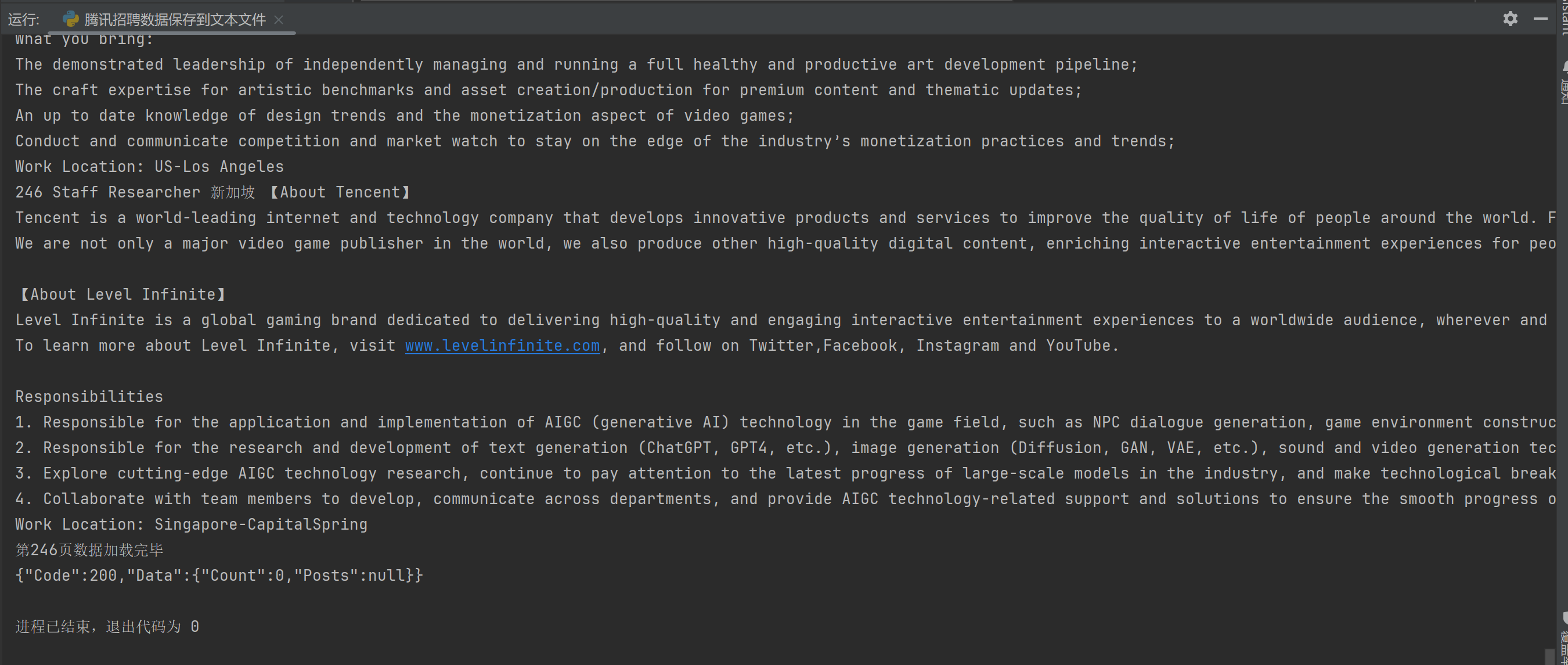
运行结果:
我们打开腾讯招聘.txt文件
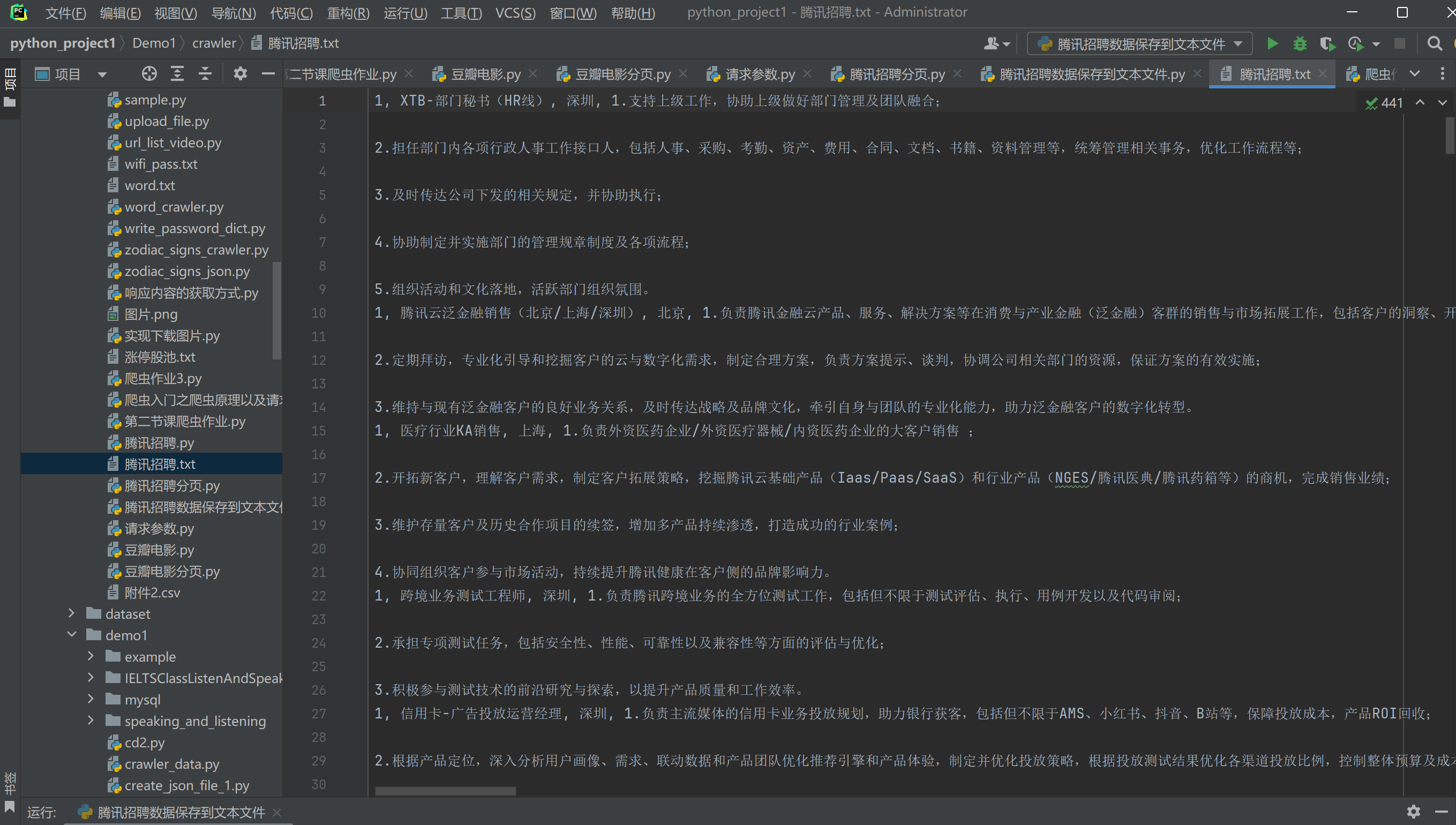
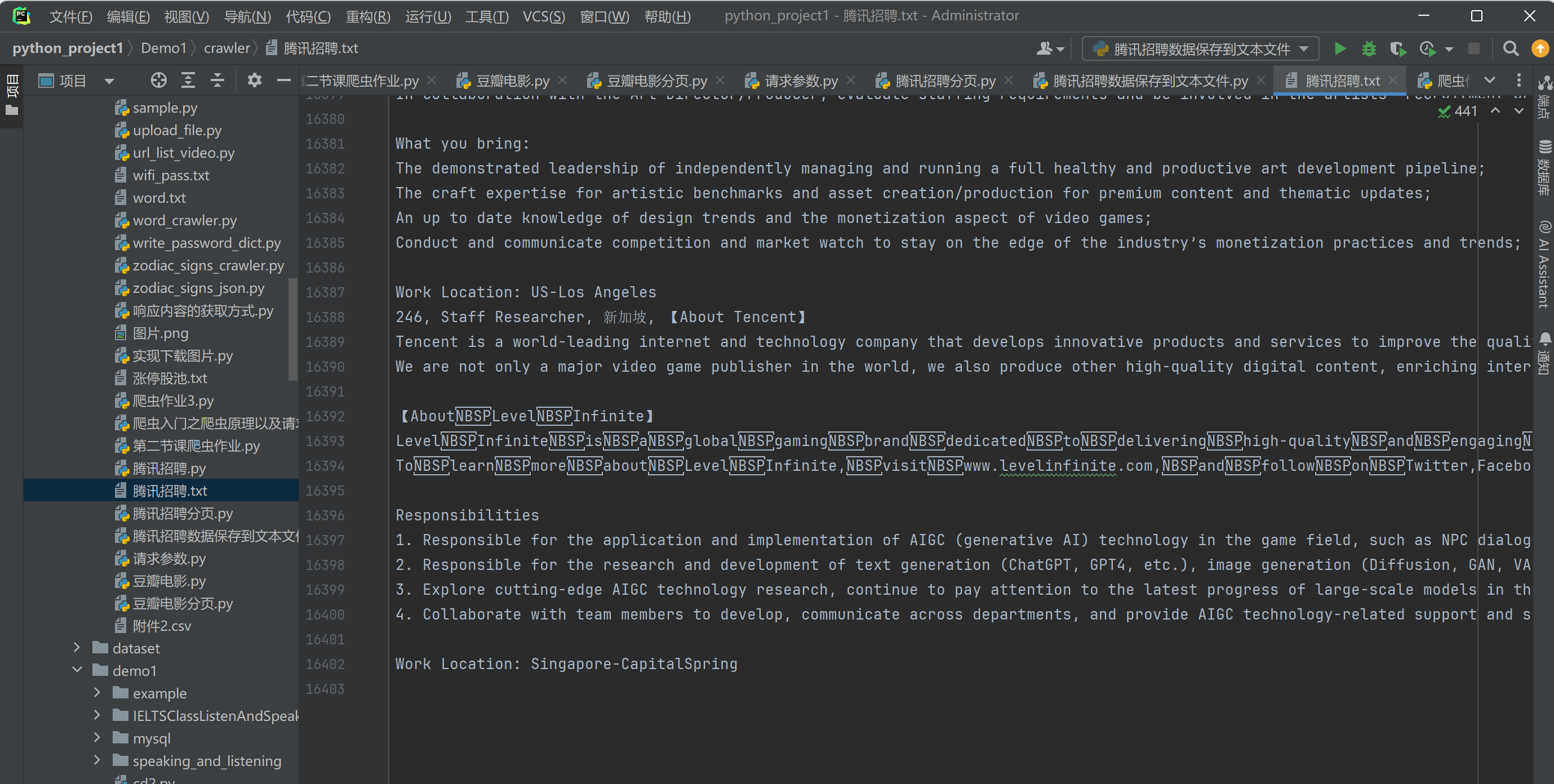
我们发现, 我们成功将爬虫爬取到的数据存入腾讯招聘.txt的文本中了。
实战:
给你一个url, 在那个网站上面进行爬虫
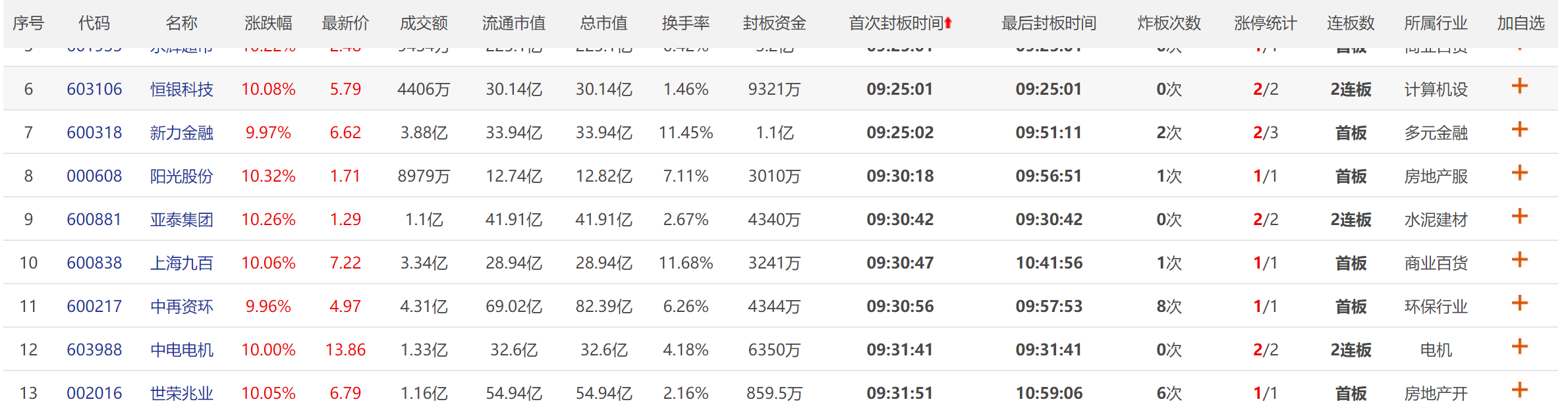
url = https://quote.eastmoney.com/ztb/detail#type=ztgc
找到这个网站数据对应的url发起请求 获取响应数据(解析的字段不限定,随意获取)
注意!!请求参数有一个cb=callbackdataxx 不要携带
提示:
找到网页当中的请求:
1.打开网站(https://quote.eastmoney.com/ztb/detail#type=ztgc), 然后再打开开发者工具f12, 找到网络。
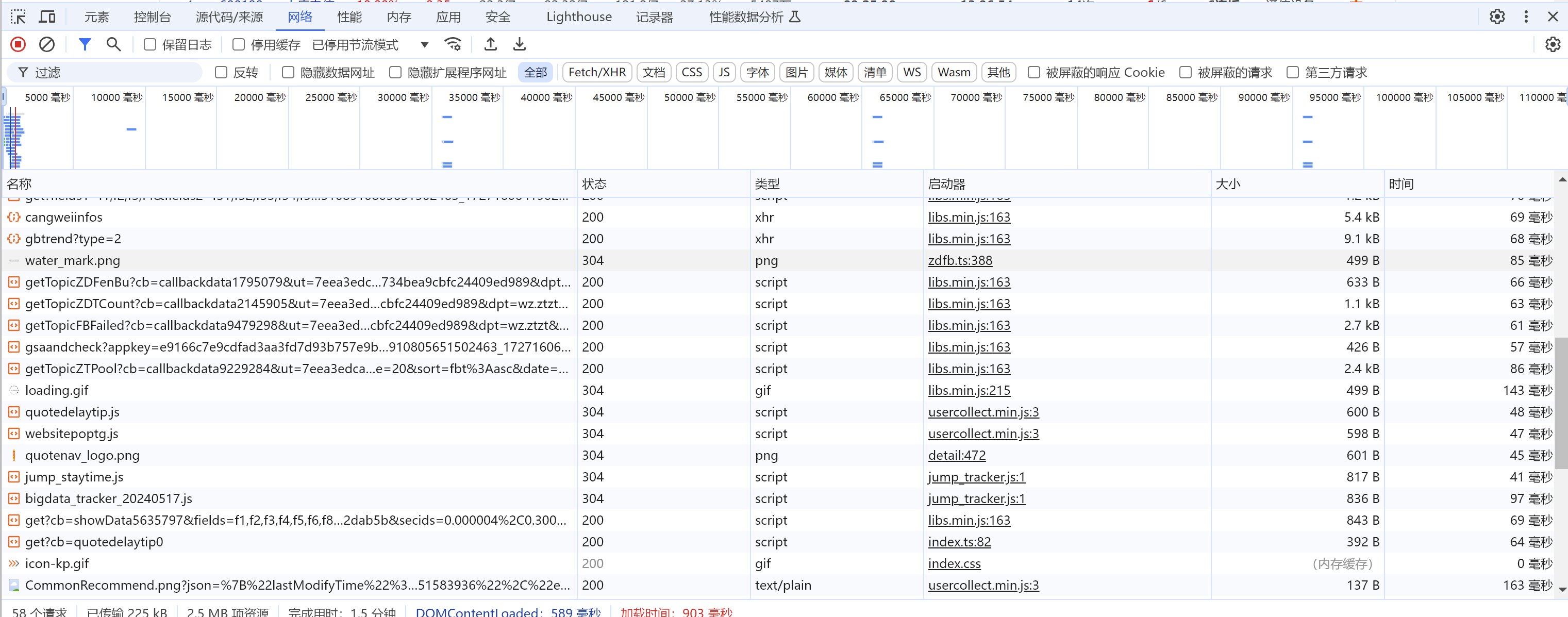
我们发现, 这里面的请求太多了, 根本不能一下子找出来哪个是请求文件, 我们可以用搜索框来搜索我们想要爬取的数据, 然后它就会显示出哪个请求里面会有这个数据。我们随便在网站上面找一个数据进行搜索。
比如我们搜索一个002016, 就是网站的表格当中的第13条数据的其中一个数据。
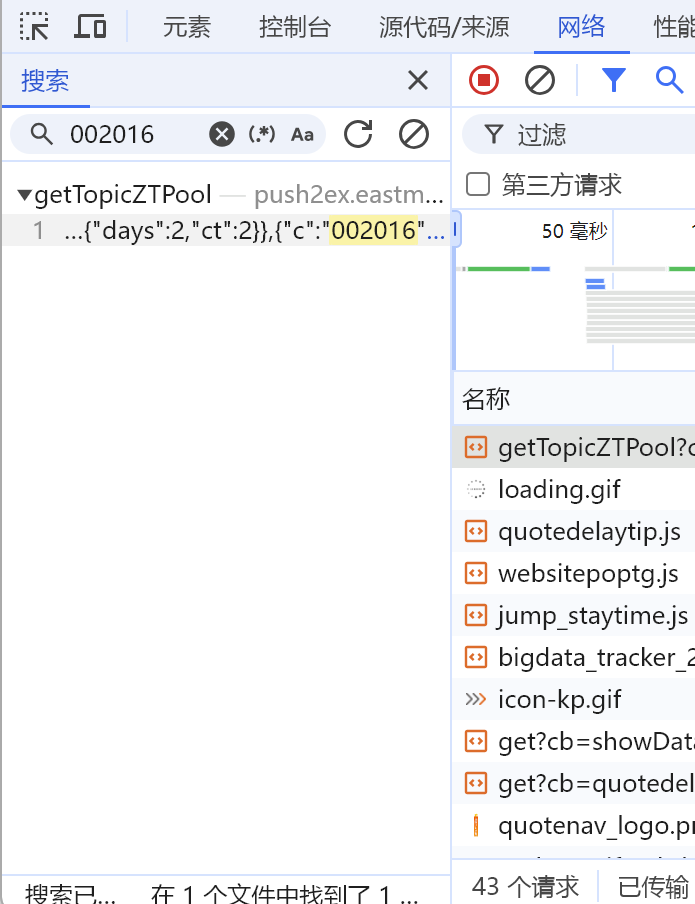
点击搜索按钮, 输入002016, 按回车, 我们可以发现下面有数据。
点击下面返回的数据, 在右边选择响应。
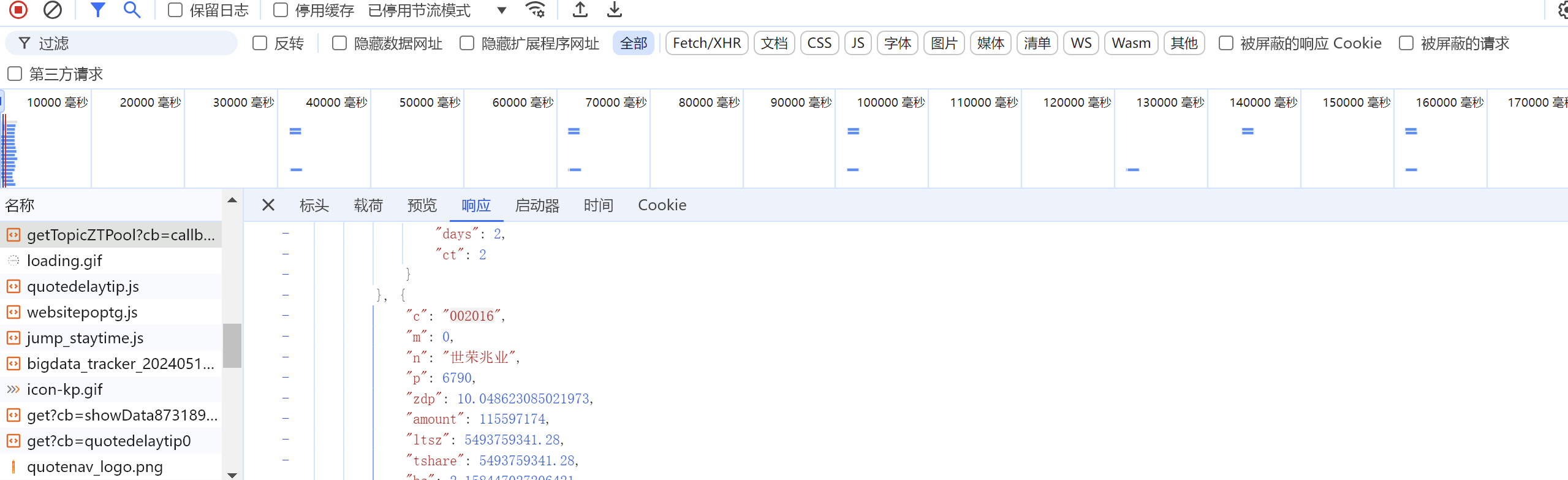
我们可以发现, 请求就在这个里面。
我们再双击打开这个请求。
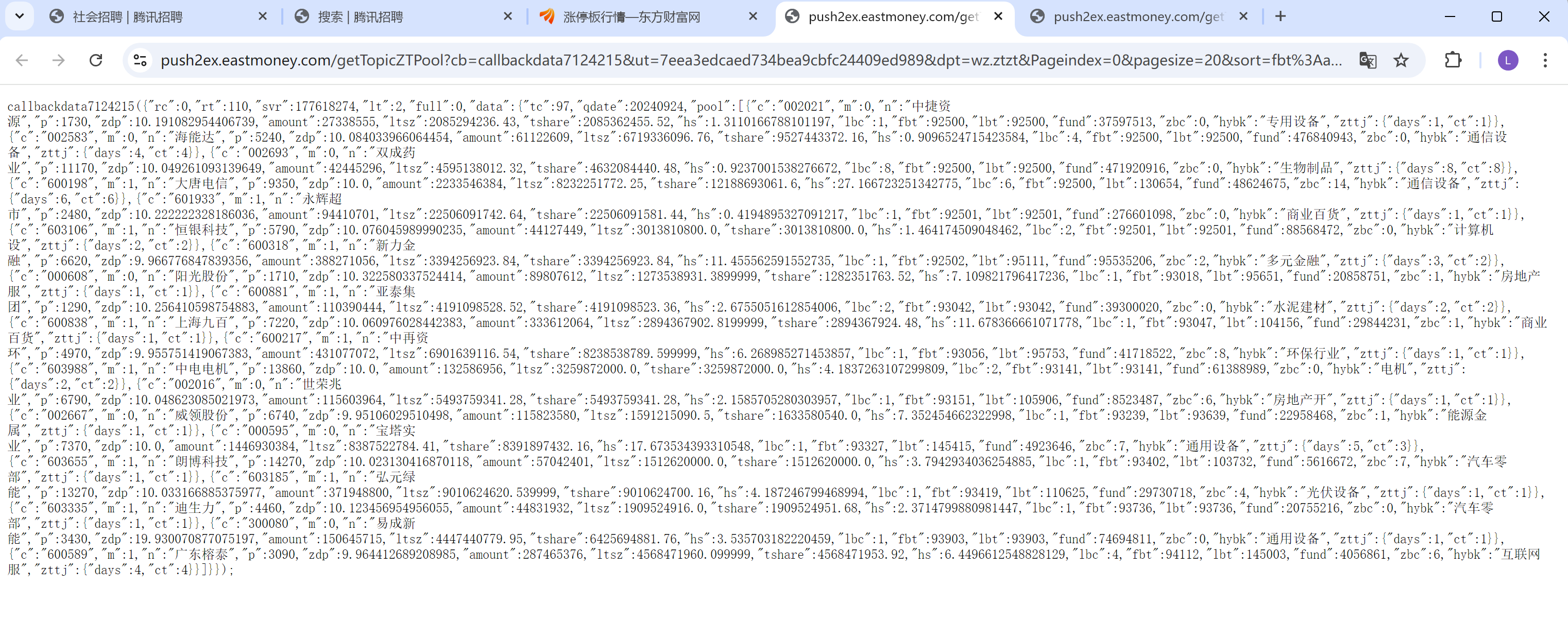
我们可以发现返回的是一些后端的数据, 这些后端的数据, 正是我们需要的响应数据。但是我们在最左上面可以发现有个callbackdata7124215, ()里面才是我们想要的数据, 那怎么办呢?
这个很简单, 在题目当中, 就已经告诉我们怎么取操作啦。

所以原本我们的请求url是https://push2ex.eastmoney.com/getTopicZTPool?cb=callbackdata7124215&ut=7eea3edcaed734bea9cbfc24409ed989&dpt=wz.ztzt&Pageindex=0&pagesize=20&sort=fbt%3Aasc&date=20240924&_=1727160924310
但是我们要把cb=callbackdataxxx这个参数去掉, 所以我们的请求最终的url是https://push2ex.eastmoney.com/getTopicZTPool?ut=7eea3edcaed734bea9cbfc24409ed989&dpt=wz.ztzt&Pageindex=0&pagesize=20&sort=fbt%3Aasc&date=20240924&_=1727160924310
先不要马上看答案, 尝试自己做一做哦。
参考答案:
import requests

page = 0
content = ""
while True:
    url = f'https://push2ex.eastmoney.com/getTopicZTPool?ut=7eea3edcaed734bea9cbfc24409ed989&dpt=wz.ztzt&Pageindex={page}&pagesize=20&sort=fbt%3Aasc&date=20240923&_=1727104055700'
    headers = {
        "user-agent": "Mozilla/5.0 (Windows NT 10.0; Win64; x64) AppleWebKit/537.36 (KHTML, like Gecko) Chrome/128.0.0.0 Safari/537.36"}
    res = requests.get(url, headers=headers)
    data = res.json()
    if len(data['data']['pool']) == 0:
        break
    for i in data['data']['pool']:
        # 代码
        code = i['c']
        # 名称
        n = i['n']
        # 涨跌幅
        zdp = i['zdp']
        zdp_float = str(round(zdp, 2)) + "%"
        # 最新价
        p = i['p']
        p_f = p / 1000
        p_number = round(p_f, 2)
        # 成交额
        amount = i['amount']
        str_amount = ""
        if amount >= 10 ** 8:
            amount /= 10 ** 8
            string = str(round(amount, 2)) + "亿"
            str_amount += string
        else:
            amount /= 10 ** 4
            string = str(round(amount)) + "万"
            str_amount += string
        # 流通市值
        ltsz = i['ltsz']
        str_ltsz = ""
        ltsz /= 10 ** 8
        str_ltsz += str(round(ltsz, 2)) + "亿"
        # 总价值
        tshare = i['tshare']
        str_tshare = ""
        tshare /= 10 ** 8
        str_tshare += str(round(tshare, 2)) + "亿"
        # 换手率
        hs = i['hs']
        str_hs = str(round(hs, 2)) + "%"
        # 封板资金
        fund = i['fund']
        str_fund = ""
        if fund >= 10 ** 8:
            fund /= 10 ** 8
            string = str(round(fund, 2)) + "亿"
            str_fund += string
        else:
            fund /= 10 ** 4
            string = str(round(fund, 1)) + "万"
            str_fund += string
        # 首次封板时间
        fbt = i['fbt']
        str_fbt = ""
        if fbt >= 100000:
            string = str(fbt)
            str_fbt += string[0:2] + ":" + string[2:4] + ":" + string[4:6]
        else:
            string = str(fbt)
            str_fbt += string[0:1] + ":" + string[1:3] + ":" + string[3:5]
        # 最后封板时间
        lbt = i['lbt']
        str_lbt = ""
        if lbt >= 100000:
            string = str(lbt)
            str_lbt += string[0:2] + ":" + string[2:4] + ":" + string[4:6]
        else:
            string = str(lbt)
            str_lbt += string[0:1] + ":" + string[1:3] + ":" + string[3:5]
        # 炸板次数
        zbc = i['zbc']
        str_zbc = str(zbc) + "次"
        # 涨停统计
        zttj = str(i['zttj']['ct']) + "/" + str(i['zttj']['days'])
        # 连版数
        lbc = i['lbc']
        str_lbc = ""
        if lbc == 1:
            string = "首版"
            str_lbc += string
        else:
            str_lbc = str(lbc) + "连扳"
        # 所属行业
        hybk = i['hybk']
        content += "代码:" + str(code) + ",名称:" + n + ",涨跌幅:" + str(zdp_float) + ",最新价(千):" + str(p_number) + ",成交额:" + str_amount + ",流通市值:" + str_ltsz + ",总价值:" + str_tshare + ",换手率:" + str_hs + ",封板资金:" + str_fund + ",首次封板时间:" + str_fbt + ",最后封板时间:" + str_lbt + ",炸板次数:" + str_zbc + ",涨停统计:" + zttj + ",连版数:" + str_lbc + ",所属行业:" + hybk + "\n"
        print("代码:", code, ",名称:", n, ",涨跌幅:", zdp_float, ",最新价(千):", p_number, ",成交额:", str_amount,
              ",流通市值:", str_ltsz, ",总价值:", str_tshare, ",换手率:", str_hs, ",封板资金:", str_fund,
              ",首次封板时间:", str_fbt, ",最后封板时间:", str_lbt, ",炸板次数:", str_zbc, ",涨停统计:", zttj,
              ",连版数:", str_lbc, ",所属行业:", hybk)
        # print(i)
    page += 1

with open("涨停股池.txt", "a", encoding="utf-8") as f:
    f.write(content)
这里面的代码, 将爬虫爬取到的数据先格式化了, 数据格式化的效果和网站上表格的数据是一样的, 然后再把爬虫爬取到的数据存入txt文件里面去()。
你写出来了吗?如果写出来的话, 给自己一个掌声哦。👏
以上就是爬虫请求响应以及提取数据的所有内容了, 如果有哪里不懂的地方,可以随时联系我, 我的qq号是1175235190, qq邮箱是1175235190@qq.com, 欢迎随时来提问题!!!
如果我有写错的地方, 望大家指正, 也可以联系我, 让我们一起努力, 继续不断的进步.
学习是个漫长的过程, 需要我们不断的去学习并掌握消化知识点, 有不懂或概念模糊不理解的情况下,一定要赶紧的解决问题, 否则问题只会越来越多, 漏洞也就越老越大.
人生路漫漫, 白鹭常相伴!!!
;}.cls-2{fill:%230868f7;}.cls-3{fill:url(%23未命名的渐变_44);}.cls-4{fill:%23333;}%3c/style%3e%3clinearGradient%20id='未命名的渐变_8'%20x1='33.73'%20y1='100.61'%20x2='-0.03'%20y2='-1.06'%20gradientUnits='userSpaceOnUse'%3e%3cstop%20offset='0'%20stop-color='%237ae9fb'/%3e%3cstop%20offset='0.67'%20stop-color='%232b90f8'/%3e%3cstop%20offset='1'%20stop-color='%230868f7'/%3e%3c/linearGradient%3e%3clinearGradient%20id='未命名的渐变_44'%20x1='27.86'%20y1='18.67'%20x2='68.36'%20y2='22.22'%20gradientUnits='userSpaceOnUse'%3e%3cstop%20offset='0'%20stop-color='%235ac7f2'/%3e%3cstop%20offset='1'%20stop-color='%230868f7'/%3e%3c/linearGradient%3e%3c/defs%3e%3cpath%20class='cls-1'%20d='M29,28.74V81.91l-9.51-3.68v0L8.52,74A7.17,7.17,0,0,1,4,67.32V24.54A3.76,3.76,0,0,1,9.08,21Z'/%3e%3cpath%20class='cls-2'%20d='M68.09,78.07a13.15,13.15,0,0,1-17.9,12.06L29,81.91h0V28.74L50.19,37A13.17,13.17,0,0,0,68.08,25.3h0Z'/%3e%3cpath%20class='cls-3'%20d='M68.08,25.3a13.19,13.19,0,0,1-6.73,10.87A13.09,13.09,0,0,1,50.19,37L29,28.74V6A3.76,3.76,0,0,1,34.1,2.52l25.59,9.91A13.22,13.22,0,0,1,68.08,25.3Z'/%3e%3cpath%20class='cls-4'%20d='M129.06,81.76a4.33,4.33,0,0,1-3.19-1.31,4.4,4.4,0,0,1-1.31-3.24V56.86H97.65V77.21a4.36,4.36,0,0,1-1.35,3.2A4.68,4.68,0,0,1,93,81.76a4.32,4.32,0,0,1-3.19-1.31,4.37,4.37,0,0,1-1.32-3.24V27.27A4.58,4.58,0,0,1,89.83,24a4.59,4.59,0,0,1,7.82,3.27V48.15h26.91V27.27A4.58,4.58,0,0,1,125.91,24a4.59,4.59,0,0,1,7.82,3.27V77.21a4.37,4.37,0,0,1-1.36,3.2A4.65,4.65,0,0,1,129.06,81.76Z'/%3e%3cpath%20class='cls-4'%20d='M163.77,81.66c-6.57,0-11.76-1.92-15.44-5.7s-5.54-9.07-5.54-15.74a26.76,26.76,0,0,1,2.09-10.43,17.72,17.72,0,0,1,6.67-8.06,19.15,19.15,0,0,1,10.68-2.95,19,19,0,0,1,10.46,2.8,18.7,18.7,0,0,1,6.55,7.36,22.53,22.53,0,0,1,2.36,10.28A4.51,4.51,0,0,1,177,63.77H152.23a10.8,10.8,0,0,0,3.49,6.65c2,1.68,4.88,2.52,8.66,2.52a22.25,22.25,0,0,0,7.54-1.21c.74-.3,1.55-.67,2.37-1.07a3.75,3.75,0,0,1,1.84-.4,4.09,4.09,0,0,1,3,1.15,4,4,0,0,1,1.12,3,4.38,4.38,0,0,1-2.58,3.82,32.34,32.34,0,0,1-6.36,2.61A28.67,28.67,0,0,1,163.77,81.66ZM172.4,55.9a9.72,9.72,0,0,0-1.63-4.56A9.9,9.9,0,0,0,167,48a10.38,10.38,0,0,0-4.64-1.14,12,12,0,0,0-4.77,1.06,9.54,9.54,0,0,0-4.89,5.66,11.78,11.78,0,0,0-.51,2.3Z'/%3e%3cpath%20class='cls-4'%20d='M193,81.64a4.49,4.49,0,0,1-4.51-4.55V27.28A4.58,4.58,0,0,1,189.84,24a4.48,4.48,0,0,1,3.28-1.36A4.36,4.36,0,0,1,196.35,24a4.46,4.46,0,0,1,1.31,3.31V77.09a4.34,4.34,0,0,1-1.35,3.2A4.67,4.67,0,0,1,193,81.64Z'/%3e%3cpath%20class='cls-4'%20d='M263.79,81.71a5.7,5.7,0,0,1-4.2-1.74,5.76,5.76,0,0,1-1.73-4.19V27.37a4.58,4.58,0,0,1,1.35-3.27A4.59,4.59,0,0,1,267,27.37V72.53h24a4.58,4.58,0,0,1,3.27,7.82A4.66,4.66,0,0,1,291,81.71Z'/%3e%3cpath%20class='cls-4'%20d='M424.48,81.74a4.71,4.71,0,0,1-2.71-.88,5.43,5.43,0,0,1-1-1l-.07-.09-12.41-17-5.41,5v9.44a4.31,4.31,0,0,1-1.36,3.19,4.66,4.66,0,0,1-3.3,1.36A4.29,4.29,0,0,1,395,80.42a4.36,4.36,0,0,1-1.32-3.23V27.37A4.58,4.58,0,0,1,395,24.1a4.52,4.52,0,0,1,6.58.12,4.54,4.54,0,0,1,1.24,3.15V56.31l17.72-16.38.05,0a4.8,4.8,0,0,1,2.94-1.11,4.4,4.4,0,0,1,3.27,1.2,4.57,4.57,0,0,1,1.2,3.27,4.44,4.44,0,0,1-.77,2.33,7.45,7.45,0,0,1-1.43,1.65l-11,9.64,13.34,17.68a5,5,0,0,1,1,2.71,4.12,4.12,0,0,1-1.36,3.24A4.64,4.64,0,0,1,424.48,81.74Z'/%3e%3cpath%20class='cls-4'%20d='M317.93,81.76a21.5,21.5,0,1,1,21.17-21.5A21.37,21.37,0,0,1,317.93,81.76Zm0-34.1a12.61,12.61,0,1,0,12.42,12.6A12.52,12.52,0,0,0,317.93,47.66Z'/%3e%3cpath%20class='cls-4'%20d='M212.18,101.22a4.12,4.12,0,0,1-3.05-1.26,4.17,4.17,0,0,1-1.26-3.1V43.34a4.37,4.37,0,0,1,1.3-3.14,4.26,4.26,0,0,1,3.13-1.3,4.19,4.19,0,0,1,3.1,1.26,4.32,4.32,0,0,1,1.26,3.16,20.77,20.77,0,0,1,13-4.54,21.51,21.51,0,0,1,0,43,20.51,20.51,0,0,1-13-4.57V96.86a4.15,4.15,0,0,1-1.3,3.06A4.5,4.5,0,0,1,212.18,101.22Zm17.43-53.63c-6.23,0-12.93,4.11-12.93,12.72a12.73,12.73,0,0,0,25.46,0A12.71,12.71,0,0,0,229.61,47.59Z'/%3e%3cpath%20class='cls-4'%20d='M365.76,81.76a21.5,21.5,0,1,1,21.18-21.5A21.37,21.37,0,0,1,365.76,81.76Zm0-34.1a12.61,12.61,0,1,0,12.42,12.6A12.52,12.52,0,0,0,365.76,47.66Z'/%3e%3c/svg%3e)